
Datascape
An internal tool for Intuit's data analysts to improve efficiency of pipeline deployment.
🖼️ Background
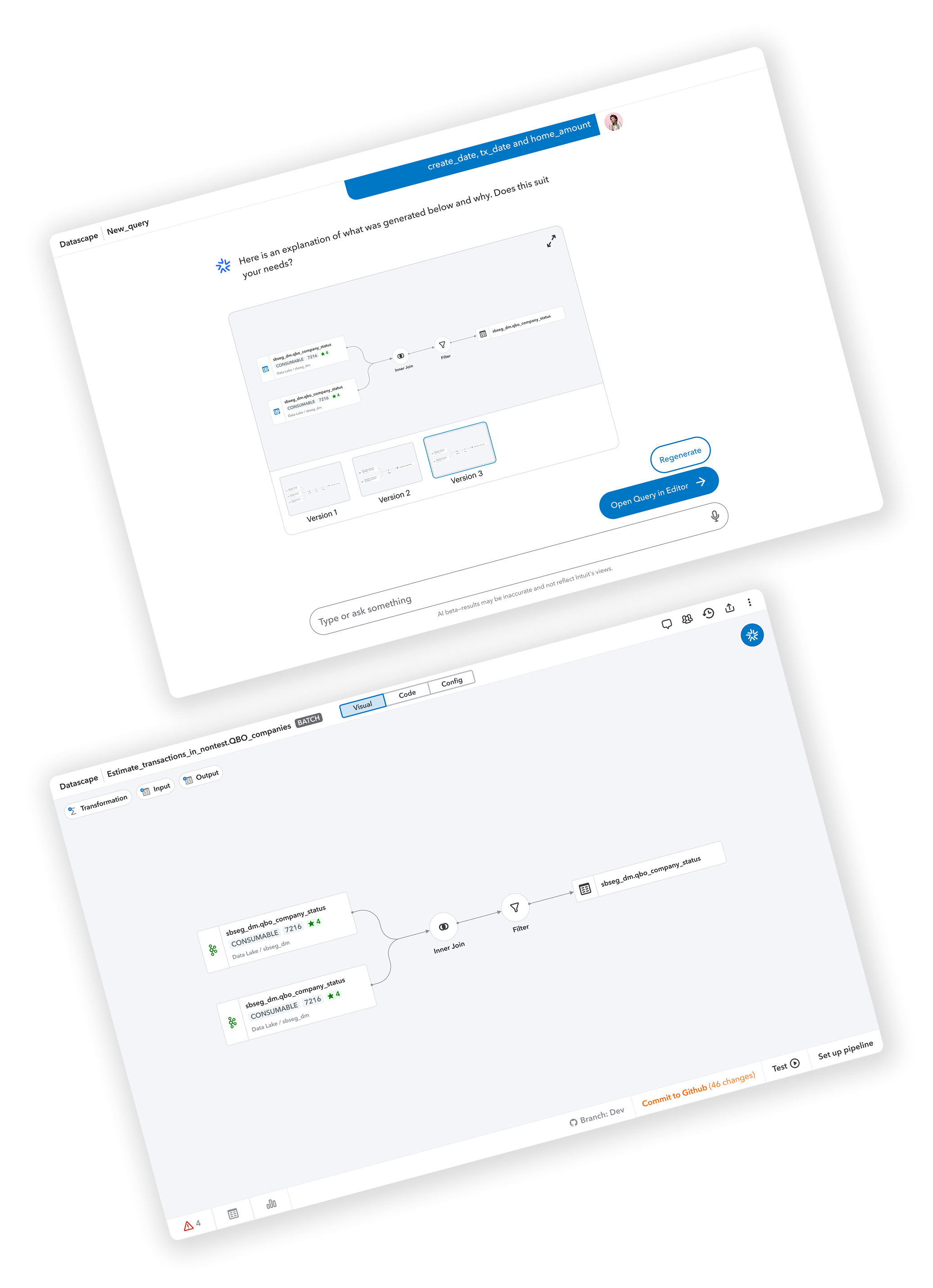
During my Product Design internship at Intuit, I was part of the Analytics, AI and Data (A2D) team working on Datascape
– an innovative internal tool designed to streamline data pipeline creation through a low-code, drag-and-drop interface
powered by generative AI. The project specifically targeted data analysts and aimed to streamline the most time-consuming
stages of their pipeline deployment process—defining data, writing code, and testing & validation, which accounted for 38%
of analysts’ time. While Intuit had existing internal tools for pipeline deployment, Datascape aimed to complement existing
internal tools by making these specific stages more efficient.
Coming into this project, I had no prior knowledge of data pipeline workflows, which pushed me to quickly adapt to navigate
a complex domain and design for specialized users with unique technical requirements. This experience strengthened my ability
to design for unfamiliar use cases, reinforcing my flexibility as a designer and deepening my understanding of how AI-driven
tools can enhance workflow efficiency.
🔄 Process
Preliminary Research
Given the particularly technical nature of the Datascape project, I dedicated a significant portion of the early stages of my
internship to comprehensive research and user understanding. This involved both extensive documentation review and direct
user engagement through Intuit's Follow-Me-Home (FMH) methodology.
I started by reading through Intuit's internal documentation to thoroughly understand the data pipeline process, its
technical requirements, and business objectives. This foundation was essential for developing informed questions for user
research and establishing the appropriate context for the design work ahead.
To gain deeper insights into real-world usage patterns and pain points, I conducted seven Follow-Me-Home sessions with data
analysts across the organization. These structured user interviews allowed me to observe how analysts currently approached
pipeline deployment, the tools they used, and the challenges they encountered throughout their workflow.
Through this research, I identified several critical pain points in the existing process:
Burdensome Deployment Process: The current multi-step deployment workflow was time-consuming and error-prone.
Inefficient Error Monitoring: Analysts struggled to quickly identify and resolve pipeline failures.
Testing Complexity: Validating pipelines across different environments presented consistent challenges.
Limited Collaboration: Knowledge sharing was hindered by a lack of collaborative tools and documentation.
Environment Inconsistencies: Managing multiple environments often led to configuration discrepancies.
Performance Bottlenecks: Large datasets and complex queries frequently caused processing delays.
Code Translation Issues: Code handoffs between analysts and engineers typically required significant reworking.
Tool Fragmentation: Setting up and maintaining multiple tools for a single pipeline created significant friction.
Defining Objectives & Features
Based on the research findings, I worked with my product design mentor and the team's project manager to establish clear
objectives and defined key features for Datascape to address the pain points identified in the data pipeline creation process.
Our overarching goal was to simplify the data processing lifecycle for data producers to measurably improve developer productivity.
Specifically, we aimed to reduce the time spent authoring, testing, and optimizing by 50%, which would translate to a 30%
reduction in overall deployment time.
Beyond the primary goal, we identified several strategic objectives that would guide our design decisions:
Improve Data Processing Efficiency
Significantly reduce time spent on authoring and testing phases of the pipeline creation process.
Ensure Data Quality
Maintain high standards for clean data and clear schema definition through automated validation.
Facilitate Collaboration
Bridge the gap between analysts and data engineers to minimize code reworking and knowledge transfer issues.
Provide Structured Experiences
Deliver automated, integrated, and structured data processing workflows that guide users through best practices.
To achieve these objectives, we identified four core features that would form the foundation of Datascape:
GenAI Integration
Transform natural language use cases directly into SQL queries, reducing the technical barrier and accelerating the code creation process.
Low-Code UI
Simplify the authoring process with an intuitive drag-and-drop interface, allowing analysts to visually construct data pipelines without extensive coding.
End-to-End Integration
Connect seamlessly with AI, analytics, and testing tools to provide a cohesive experience throughout the entire pipeline development process.
Streamlined Workflow
Create an optimized path for code authoring, testing, and validation that reduces friction points and accelerates iteration cycles.
User Flow Mapping
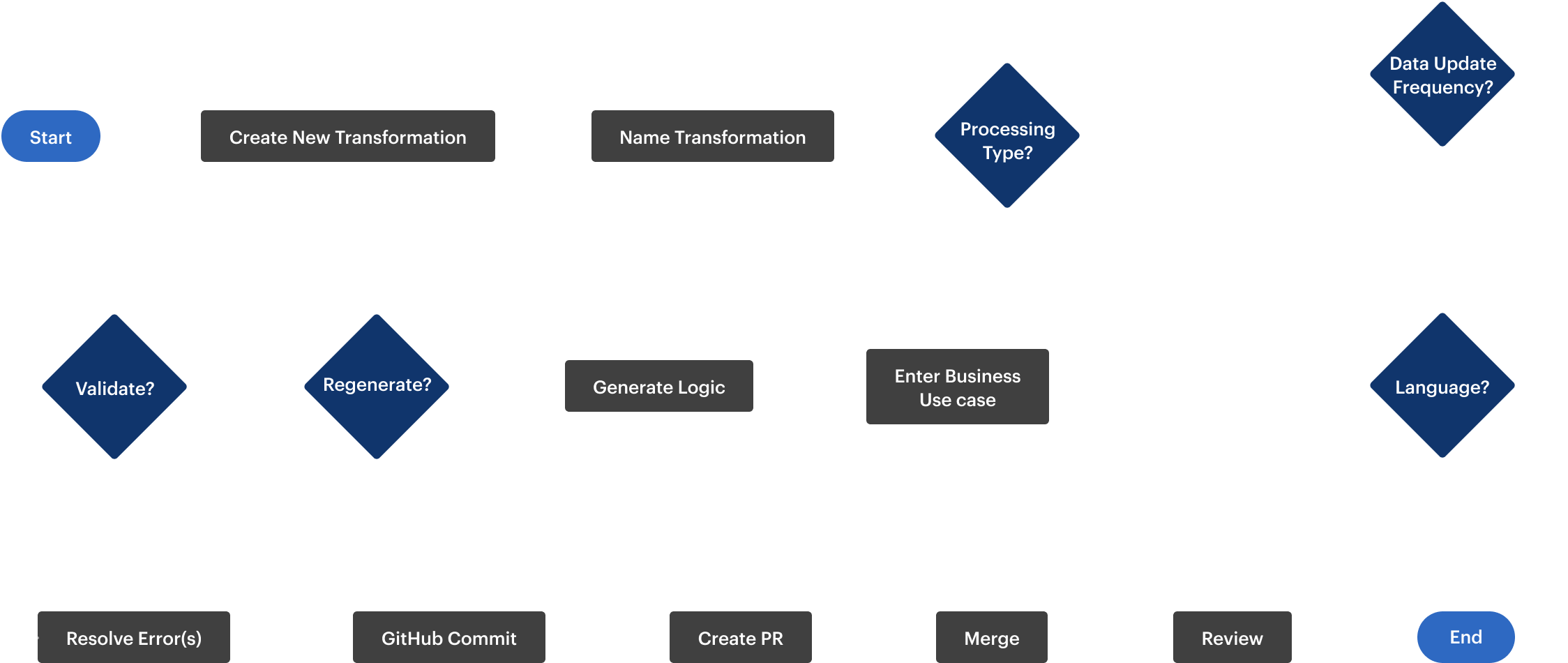
To illustrate the core functionality of Datascape, I created a streamlined user flow diagram that maps the essential end-to-end process—from defining pipeline requirements through creation, testing, and deployment. This visualization demonstrates the logical progression of steps a data analyst would follow when using the tool, highlighting how Datascape simplifies what was previously a fragmented workflow.
Planning Sketches
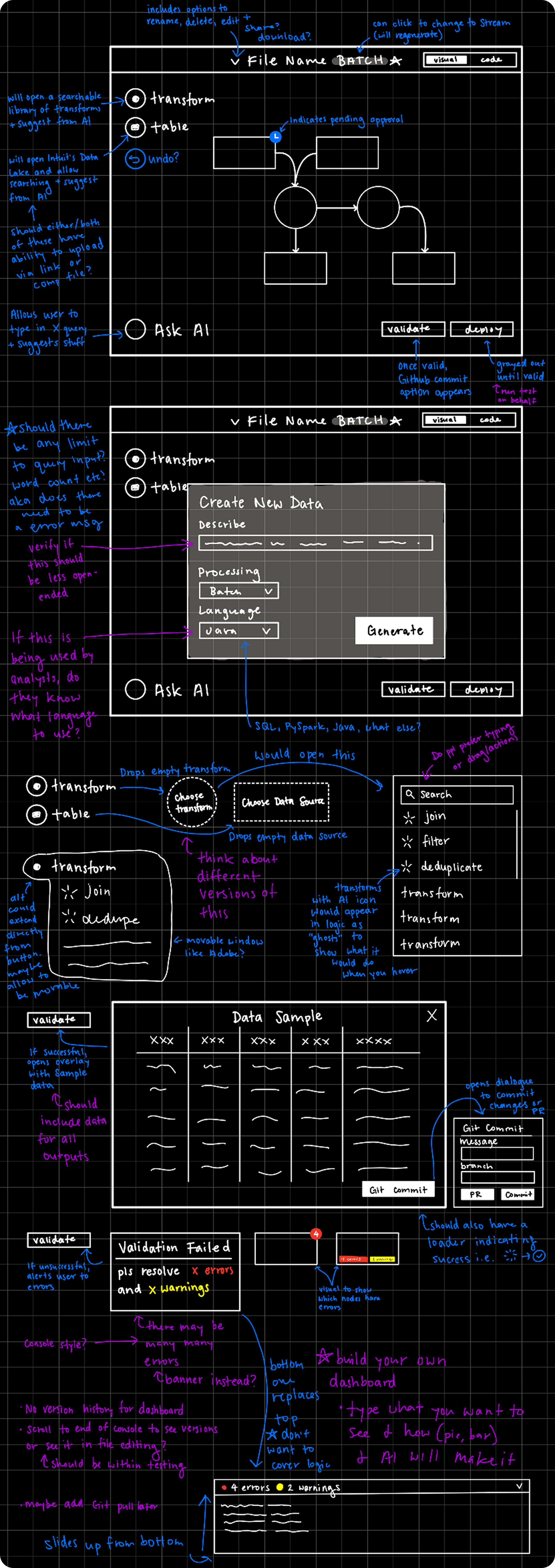
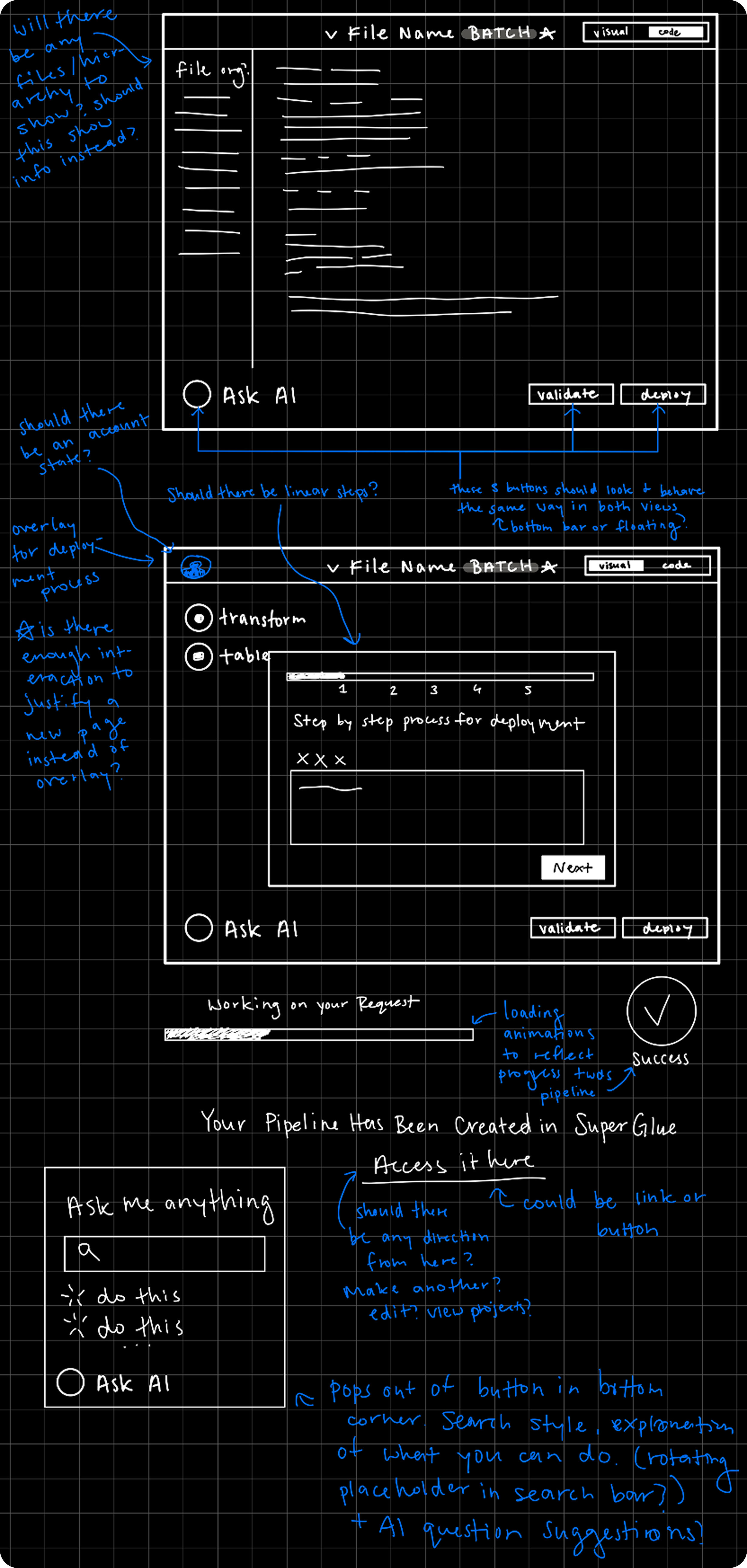
Following our established objectives, I began the design process with initial sketches that mapped out the conceptual flow of Datascape's pipeline creation experience, focusing on the logical progression between stages and how users would navigate from natural language inputs through to finalized, testable code.
🎨 Design
Below are videos of some of the main flows of Datascape's low-code editor.
Adding a basic sort transform.
Adding and deleting a transform suggested by AI.
Adding a custom transformation and using AI for code suggestions.
Swapping a data source, adding a new data source, and adding a new output table.
⏭️ User Testing
Overall Findings
To validate design decisions and gather actionable feedback before development, I conducted user testing sessions with
five potential users from our target audience of data analysts and related roles.
We structured our testing around realistic scenarios that required participants to complete specific tasks using our
interactive prototype. Additionally, we incorporated A/B testing to evaluate two different approaches to the onboarding
experience: an AI chatbot flow versus a traditional modal form.
Our testing revealed several critical insights that challenged some of our initial assumptions while validating others:
Technical Preferences
Most data workers expressed a preference for directly editing code rather than using the low-code editor, as participants demonstrated high comfort levels with writing their own code. However, they still valued the low-code view as a visualization tool to conceptualize their pipeline structure.
Role-Based Considerations
The testing suggested that our low-code interface might provide more value to adjacent roles (Product Managers, Marketing Managers) who prefer to avoid technical complexity. This insight prompted us to consider how Datascape might serve as a bridge between technical and non-technical stakeholders.
AI Integration Perceptions
Data analysts showed interest in using GenAI capabilities as a starting point for their work, but most expressed healthy skepticism toward AI-generated content, noting they would still verify and modify any AI-generated code. This validated our approach of positioning AI as an assistant rather than a replacement.
Tool Transition Concerns
Users expressed hesitation about the cost (time and effort) of transitioning from their current workflows to a new tool, which highlighted the importance of demonstrating clear value and providing a seamless process of migration.
Feature Validation
The ability to author, test, and work iteratively within a single tool generated significant excitement, and participants particularly appreciated how Datascape handled tedious aspects like processor and pipeline setup.
Onboarding A/B Testing
During user testing, I conducted a modified A/B test to evaluate two different onboarding flow designs, which are shown below. Rather than splitting users between versions as in traditional A/B testing, I had all five participants experience both flows sequentially due to our limited sample size. This approach allowed me to gather comparative feedback from each tester on both designs, maximizing insights from our small user group while still enabling a direct performance comparison between the two onboarding experiences.
AI chatbot onboarding flow.
Modal onboarding flow.
In user testing, the modal design outperformed the AI chatbot flow, which directly impacted the final design. Users reported feeling that the AI chatbot did not have enough added value to warrant the longer amount of time it took as compared to the modal. Users preferred the modal design because they claimed it was much more direct and quick to use.
🌎 Impact & Outcome
Feedback from our diverse group of testers revealed Datascape's potential to transform data pipeline workflows across
different roles and use cases.
"Because I've been burned a few times by GenAI, I'm a bit wary with GenAI code."
This feedback from a Product Analyst further verified our approach of positioning AI as an assistant rather than a replacement in the workflow.
"This low code experience could be useful for [other roles]. We have some PMs who are interested in the data, but they don't have the ability to access it without training themselves on SQL, so I definitely see a use case for this."
This feedback from a Technical Data Analyst highlighted an unexpected opportunity for Datascape to appeal to a more diverse audience.
"Overall, I think there's a lot of potential here, and it definitely could make some parts of our work much faster."
This feedback confirmed our core objective of improving productivity in the data pipeline process.